> ## Documentation Index
> Fetch the complete documentation index at: https://docs.edicek.com/llms.txt
> Use this file to discover all available pages before exploring further.

# Mac

export const DownloadButton = ({href, label, icon, href2, label2, icon2, divider = true}) => <div style={{
  display: 'flex',
  flexWrap: 'wrap',
  gap: '10px',
  margin: divider ? '16px 0 28px' : '16px 0 10px',
  paddingBottom: divider ? '28px' : '0',
  borderBottom: divider ? '1px solid #ecdfcd' : 'none'
}}>
    <a href={href} target="_blank" rel="noreferrer" onMouseEnter={e => {
  e.currentTarget.style.background = '#333333';
}} onMouseLeave={e => {
  e.currentTarget.style.background = '#161616';
}} style={{
  display: 'inline-flex',
  alignItems: 'center',
  justifyContent: 'center',
  gap: '9px',
  height: '46px',
  padding: '0 22px',
  boxSizing: 'border-box',
  border: '1px solid transparent',
  borderRadius: '11px',
  background: '#161616',
  color: '#ffffff',
  fontWeight: 600,
  fontSize: '15px',
  lineHeight: 1,
  textDecoration: 'none',
  transition: 'background 0.15s ease'
}}>
      <svg width="17" height="17" viewBox="0 0 24 24" fill="none" stroke="currentColor" strokeWidth="2" strokeLinecap="round" strokeLinejoin="round" aria-hidden="true">
        {icon === 'open' ? <g>
            <path d="M7 17 17 7" />
            <path d="M8 7h9v9" />
          </g> : <g>
            <path d="M12 3v12" />
            <path d="m7 12 5 5 5-5" />
            <path d="M5 21h14" />
          </g>}
      </svg>
      {label}
    </a>
    {href2 ? <a href={href2} target="_blank" rel="noreferrer" onMouseEnter={e => {
  e.currentTarget.style.background = '#333333';
}} onMouseLeave={e => {
  e.currentTarget.style.background = '#161616';
}} style={{
  display: 'inline-flex',
  alignItems: 'center',
  justifyContent: 'center',
  gap: '9px',
  height: '46px',
  padding: '0 22px',
  boxSizing: 'border-box',
  border: '1px solid transparent',
  borderRadius: '11px',
  background: '#161616',
  color: '#ffffff',
  fontWeight: 600,
  fontSize: '15px',
  lineHeight: 1,
  textDecoration: 'none',
  transition: 'background 0.15s ease'
}}>
        <svg width="17" height="17" viewBox="0 0 24 24" fill="none" stroke="currentColor" strokeWidth="2" strokeLinecap="round" strokeLinejoin="round" aria-hidden="true">
          {icon2 === 'open' ? <g>
              <path d="M7 17 17 7" />
              <path d="M8 7h9v9" />
            </g> : <g>
              <path d="M12 3v12" />
              <path d="m7 12 5 5 5-5" />
              <path d="M5 21h14" />
            </g>}
        </svg>
        {label2}
      </a> : null}
  </div>;

export const LoopVideo = ({src, poster, variant, autoPreload}) => (variant === 'tall' || variant === 'classic') && typeof autoPreload === 'boolean' ? <div onMouseEnter={e => {
  const replay = e.currentTarget.querySelector('[data-replay]');
  if (replay) replay.style.opacity = '1';
}} onMouseLeave={e => {
  const replay = e.currentTarget.querySelector('[data-replay]');
  if (replay) replay.style.opacity = '0';
}} style={{
  position: 'relative',
  margin: '18px 0 6px',
  aspectRatio: variant === 'tall' ? '3 / 4' : '4 / 3',
  borderRadius: '14px',
  border: '1px solid #ecdfcd',
  overflow: 'hidden',
  background: '#FFFBF2'
}}>
    <video ref={el => {
  if (!el || el.dataset.lazyInit) return;
  el.dataset.lazyInit = '1';
  el.muted = true;
  const box = el.parentElement;
  const loading = box && box.querySelector('[data-loading]');
  const hideLoading = () => {
    if (loading && el.readyState >= 2) loading.style.opacity = '0';
  };
  el.addEventListener('loadeddata', hideLoading);
  el.addEventListener('playing', hideLoading);
  const startPlay = () => {
    if (el.preload !== 'auto') el.preload = 'auto';
    if (el.readyState === 0) el.load();
    const attempt = el.play();
    if (attempt && attempt.catch) {
      attempt.catch(() => {
        el.addEventListener('canplay', () => el.play().catch(() => {}), {
          once: true
        });
      });
    }
  };
  if (autoPreload || typeof IntersectionObserver === 'undefined') {
    startPlay();
    return;
  }
  const io = new IntersectionObserver(entries => {
    entries.forEach(entry => {
      if (entry.isIntersecting) startPlay(); else el.pause();
    });
  }, {
    rootMargin: '150px'
  });
  io.observe(el);
}} muted loop playsInline preload={autoPreload ? 'auto' : 'metadata'} poster={poster} onClick={e => {
  const el = e.currentTarget;
  const pill = el.parentElement && el.parentElement.querySelector('[data-pill]');
  const show = (text, autoHide) => {
    if (!pill) return;
    pill.textContent = text;
    clearTimeout(pill._t);
    pill.style.opacity = '1';
    if (autoHide) {
      pill._t = setTimeout(() => {
        pill.style.opacity = '0';
      }, 900);
    }
  };
  if (el.paused) {
    el.play().catch(() => {});
    show('Unpaused', true);
  } else {
    el.pause();
    show('Paused', false);
  }
}} style={{
  position: 'absolute',
  inset: 0,
  width: '100%',
  height: '100%',
  margin: 0,
  objectFit: 'cover',
  display: 'block',
  cursor: 'pointer'
}}>
      <source src={src} type="video/mp4" />
    </video>
    <div data-loading style={{
  position: 'absolute',
  inset: 0,
  display: 'flex',
  alignItems: 'center',
  justifyContent: 'center',
  opacity: 1,
  transition: 'opacity 0.3s ease',
  pointerEvents: 'none',
  backgroundColor: '#FFFBF2',
  backgroundImage: 'url(/images/video-background.jpeg)',
  backgroundSize: 'auto 100%',
  backgroundPosition: 'center',
  backgroundRepeat: 'no-repeat',
  fontFamily: 'ui-monospace, SFMono-Regular, Menlo, monospace',
  fontSize: '11px',
  fontWeight: 600,
  letterSpacing: '0.08em',
  textTransform: 'uppercase',
  color: '#8a7f70'
}}>
      Video is loading…
    </div>
    <button data-replay type="button" aria-label="Replay from the start" onClick={e => {
  e.stopPropagation();
  const box = e.currentTarget.parentElement;
  const video = box && box.querySelector('video');
  const pill = box && box.querySelector('[data-pill]');
  if (pill) pill.style.opacity = '0';
  if (video) {
    video.currentTime = 0;
    video.play().catch(() => {});
  }
}} style={{
  position: 'absolute',
  top: '10px',
  left: '10px',
  display: 'flex',
  alignItems: 'center',
  justifyContent: 'center',
  width: '32px',
  height: '32px',
  padding: 0,
  opacity: 0,
  transition: 'opacity 0.25s ease',
  color: '#ffffff',
  background: 'rgba(19, 22, 27, 0.72)',
  backdropFilter: 'blur(4px)',
  border: 'none',
  borderRadius: '999px',
  cursor: 'pointer'
}}>
      <svg width="16" height="16" viewBox="0 0 24 24" fill="none" stroke="currentColor" strokeWidth="2" strokeLinecap="round" strokeLinejoin="round" aria-hidden="true">
        <path d="M3 12a9 9 0 1 0 3-6.7L3 8" />
        <path d="M3 3v5h5" />
      </svg>
    </button>
    <div data-pill style={{
  position: 'absolute',
  top: '10px',
  right: '10px',
  opacity: 0,
  transition: 'opacity 0.25s ease',
  fontFamily: 'ui-monospace, SFMono-Regular, Menlo, monospace',
  fontSize: '11px',
  fontWeight: 600,
  letterSpacing: '0.06em',
  textTransform: 'uppercase',
  color: '#ffffff',
  background: 'rgba(19, 22, 27, 0.72)',
  backdropFilter: 'blur(4px)',
  borderRadius: '999px',
  padding: '4px 10px',
  pointerEvents: 'none'
}}>
      Paused
    </div>
  </div> : <div style={{
  margin: '18px 0 6px',
  padding: '12px 16px',
  borderRadius: '10px',
  border: '2px solid #d33',
  background: '#ffe5e5',
  color: '#990000',
  fontFamily: 'ui-monospace, SFMono-Regular, Menlo, monospace',
  fontSize: '13px',
  lineHeight: 1.5
}}>
      {'<LoopVideo>'} needs <strong>variant</strong> (<strong>"tall"</strong> = 3:4 or <strong>"classic"</strong> = 4:3)
      and <strong>autoPreload</strong> ({'{true}'} or {'{false}'}).
    </div>;

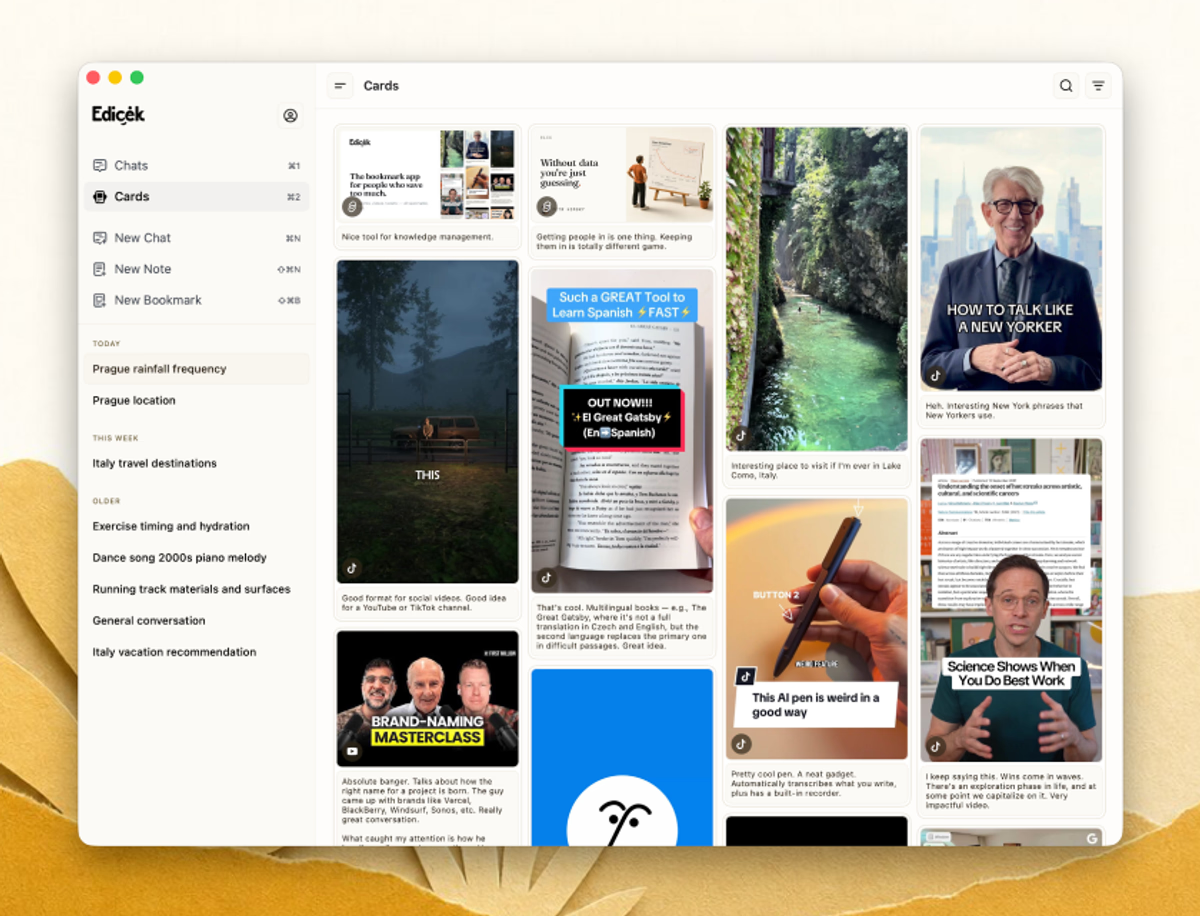
Edicek as a real desktop app, built for the keyboard. Live in your timeline, start a chat with `Cmd+N`, and drive your whole knowledge base without reaching for the mouse.

It's a universal app - the same Edicek across all your Apple devices - so it installs from the App Store. Don't be thrown if the download opens what looks like the iPhone listing; it installs and runs natively on your Mac just the same.

<DownloadButton href="https://apps.apple.com/cz/app/edicek/id6757395657" label="Download on the App Store" icon="download" />

<img src="https://mintcdn.com/edicek/gTB_yjO6_rYa_WRS/images/applications/mac.avif?fit=max&auto=format&n=gTB_yjO6_rYa_WRS&q=85&s=c110e235c147d22d4c607c0fc7e58ae5" alt="The Edicek Mac app - your timeline of saved cards in a native desktop window." style={{ width: '100%', borderRadius: '14px', border: '1px solid #ecdfcd', display: 'block', margin: '0 0 6px' }} width="1200" height="916" data-path="images/applications/mac.avif" />

## A native desktop app

The Mac app is a proper native application, not a browser tab. It opens fast, sits in your Dock, and fits into your desktop workflow - switch to it with `Cmd+Tab`, save a link, ask a question, and get back to work. Everything syncs with the same library you use on the [web](/applications/web) and your phone.

## Save from the app

You don't need to leave the app to add something. In the sidebar, click **New Bookmark** to save a link - paste the URL and add a note about **WHY** it matters - or **New Note** to write a thought of your own. Save, and it lands in your timeline.

<Tabs>
  <Tab title="Bookmark">
    <LoopVideo src="/videos/app-mac-new-bookmark.mp4" variant="classic" autoPreload={true} />
  </Tab>

  <Tab title="Note">
    <LoopVideo src="/videos/app-mac-new-note.mp4" variant="classic" autoPreload={false} />
  </Tab>
</Tabs>

## Keyboard-driven workflow

The Mac app is at its best when your hands stay on the keyboard. Jump between your chats and cards, or create something new, without ever reaching for the mouse:

| Action                | Shortcut |
| --------------------- | -------- |
| Chats                 | `⌘1`     |
| Cards                 | `⌘2`     |
| New Chat              | `⌘N`     |
| New Note              | `⇧⌘N`    |
| New Bookmark          | `⇧⌘B`    |
| Toggle memory in chat | `⌘K`     |
| Refresh cards         | `⌘R`     |

## Next steps

<Columns cols={2}>
  <Card title="iPhone & iPad" icon="mobile" href="/applications/iphone-and-ipad">
    Edicek on the go.
  </Card>

  <Card title="Web" icon="globe" href="/applications/web">
    The full Edicek in your browser.
  </Card>
</Columns>