> ## Documentation Index
> Fetch the complete documentation index at: https://docs.edicek.com/llms.txt
> Use this file to discover all available pages before exploring further.

# Web

export const DownloadButton = ({href, label, icon, href2, label2, icon2, divider = true}) => <div style={{
  display: 'flex',
  flexWrap: 'wrap',
  gap: '10px',
  margin: divider ? '16px 0 28px' : '16px 0 10px',
  paddingBottom: divider ? '28px' : '0',
  borderBottom: divider ? '1px solid #ecdfcd' : 'none'
}}>
    <a href={href} target="_blank" rel="noreferrer" onMouseEnter={e => {
  e.currentTarget.style.background = '#333333';
}} onMouseLeave={e => {
  e.currentTarget.style.background = '#161616';
}} style={{
  display: 'inline-flex',
  alignItems: 'center',
  justifyContent: 'center',
  gap: '9px',
  height: '46px',
  padding: '0 22px',
  boxSizing: 'border-box',
  border: '1px solid transparent',
  borderRadius: '11px',
  background: '#161616',
  color: '#ffffff',
  fontWeight: 600,
  fontSize: '15px',
  lineHeight: 1,
  textDecoration: 'none',
  transition: 'background 0.15s ease'
}}>
      <svg width="17" height="17" viewBox="0 0 24 24" fill="none" stroke="currentColor" strokeWidth="2" strokeLinecap="round" strokeLinejoin="round" aria-hidden="true">
        {icon === 'open' ? <g>
            <path d="M7 17 17 7" />
            <path d="M8 7h9v9" />
          </g> : <g>
            <path d="M12 3v12" />
            <path d="m7 12 5 5 5-5" />
            <path d="M5 21h14" />
          </g>}
      </svg>
      {label}
    </a>
    {href2 ? <a href={href2} target="_blank" rel="noreferrer" onMouseEnter={e => {
  e.currentTarget.style.background = '#333333';
}} onMouseLeave={e => {
  e.currentTarget.style.background = '#161616';
}} style={{
  display: 'inline-flex',
  alignItems: 'center',
  justifyContent: 'center',
  gap: '9px',
  height: '46px',
  padding: '0 22px',
  boxSizing: 'border-box',
  border: '1px solid transparent',
  borderRadius: '11px',
  background: '#161616',
  color: '#ffffff',
  fontWeight: 600,
  fontSize: '15px',
  lineHeight: 1,
  textDecoration: 'none',
  transition: 'background 0.15s ease'
}}>
        <svg width="17" height="17" viewBox="0 0 24 24" fill="none" stroke="currentColor" strokeWidth="2" strokeLinecap="round" strokeLinejoin="round" aria-hidden="true">
          {icon2 === 'open' ? <g>
              <path d="M7 17 17 7" />
              <path d="M8 7h9v9" />
            </g> : <g>
              <path d="M12 3v12" />
              <path d="m7 12 5 5 5-5" />
              <path d="M5 21h14" />
            </g>}
        </svg>
        {label2}
      </a> : null}
  </div>;

export const LoopVideo = ({src, poster, variant, autoPreload}) => (variant === 'tall' || variant === 'classic') && typeof autoPreload === 'boolean' ? <div onMouseEnter={e => {
  const replay = e.currentTarget.querySelector('[data-replay]');
  if (replay) replay.style.opacity = '1';
}} onMouseLeave={e => {
  const replay = e.currentTarget.querySelector('[data-replay]');
  if (replay) replay.style.opacity = '0';
}} style={{
  position: 'relative',
  margin: '18px 0 6px',
  aspectRatio: variant === 'tall' ? '3 / 4' : '4 / 3',
  borderRadius: '14px',
  border: '1px solid #ecdfcd',
  overflow: 'hidden',
  background: '#FFFBF2'
}}>
    <video ref={el => {
  if (!el || el.dataset.lazyInit) return;
  el.dataset.lazyInit = '1';
  el.muted = true;
  const box = el.parentElement;
  const loading = box && box.querySelector('[data-loading]');
  const hideLoading = () => {
    if (loading && el.readyState >= 2) loading.style.opacity = '0';
  };
  el.addEventListener('loadeddata', hideLoading);
  el.addEventListener('playing', hideLoading);
  const startPlay = () => {
    el.play().catch(() => {});
  };
  if (autoPreload || typeof IntersectionObserver === 'undefined') {
    startPlay();
    return;
  }
  const io = new IntersectionObserver(entries => {
    entries.forEach(entry => {
      if (entry.isIntersecting) startPlay(); else el.pause();
    });
  }, {
    rootMargin: '150px'
  });
  io.observe(el);
}} muted loop playsInline preload={autoPreload ? 'auto' : 'none'} poster={poster} onClick={e => {
  const el = e.currentTarget;
  const pill = el.parentElement && el.parentElement.querySelector('[data-pill]');
  const show = (text, autoHide) => {
    if (!pill) return;
    pill.textContent = text;
    clearTimeout(pill._t);
    pill.style.opacity = '1';
    if (autoHide) {
      pill._t = setTimeout(() => {
        pill.style.opacity = '0';
      }, 900);
    }
  };
  if (el.paused) {
    el.play().catch(() => {});
    show('Unpaused', true);
  } else {
    el.pause();
    show('Paused', false);
  }
}} style={{
  position: 'absolute',
  inset: 0,
  width: '100%',
  height: '100%',
  margin: 0,
  objectFit: 'cover',
  display: 'block',
  cursor: 'pointer'
}}>
      <source src={src} type="video/mp4" />
    </video>
    <div data-loading style={{
  position: 'absolute',
  inset: 0,
  display: 'flex',
  alignItems: 'center',
  justifyContent: 'center',
  opacity: 1,
  transition: 'opacity 0.3s ease',
  pointerEvents: 'none',
  backgroundColor: '#FFFBF2',
  backgroundImage: 'url(/images/video-background.jpeg)',
  backgroundSize: 'auto 100%',
  backgroundPosition: 'center',
  backgroundRepeat: 'no-repeat',
  fontFamily: 'ui-monospace, SFMono-Regular, Menlo, monospace',
  fontSize: '11px',
  fontWeight: 600,
  letterSpacing: '0.08em',
  textTransform: 'uppercase',
  color: '#8a7f70'
}}>
      Video is loading…
    </div>
    <button data-replay type="button" aria-label="Replay from the start" onClick={e => {
  e.stopPropagation();
  const box = e.currentTarget.parentElement;
  const video = box && box.querySelector('video');
  const pill = box && box.querySelector('[data-pill]');
  if (pill) pill.style.opacity = '0';
  if (video) {
    video.currentTime = 0;
    video.play().catch(() => {});
  }
}} style={{
  position: 'absolute',
  top: '10px',
  left: '10px',
  display: 'flex',
  alignItems: 'center',
  justifyContent: 'center',
  width: '32px',
  height: '32px',
  padding: 0,
  opacity: 0,
  transition: 'opacity 0.25s ease',
  color: '#ffffff',
  background: 'rgba(19, 22, 27, 0.72)',
  backdropFilter: 'blur(4px)',
  border: 'none',
  borderRadius: '999px',
  cursor: 'pointer'
}}>
      <svg width="16" height="16" viewBox="0 0 24 24" fill="none" stroke="currentColor" strokeWidth="2" strokeLinecap="round" strokeLinejoin="round" aria-hidden="true">
        <path d="M3 12a9 9 0 1 0 3-6.7L3 8" />
        <path d="M3 3v5h5" />
      </svg>
    </button>
    <div data-pill style={{
  position: 'absolute',
  top: '10px',
  right: '10px',
  opacity: 0,
  transition: 'opacity 0.25s ease',
  fontFamily: 'ui-monospace, SFMono-Regular, Menlo, monospace',
  fontSize: '11px',
  fontWeight: 600,
  letterSpacing: '0.06em',
  textTransform: 'uppercase',
  color: '#ffffff',
  background: 'rgba(19, 22, 27, 0.72)',
  backdropFilter: 'blur(4px)',
  borderRadius: '999px',
  padding: '4px 10px',
  pointerEvents: 'none'
}}>
      Paused
    </div>
  </div> : <div style={{
  margin: '18px 0 6px',
  padding: '12px 16px',
  borderRadius: '10px',
  border: '2px solid #d33',
  background: '#ffe5e5',
  color: '#990000',
  fontFamily: 'ui-monospace, SFMono-Regular, Menlo, monospace',
  fontSize: '13px',
  lineHeight: 1.5
}}>
      {'<LoopVideo>'} needs <strong>variant</strong> (<strong>"tall"</strong> = 3:4 or <strong>"classic"</strong> = 4:3)
      and <strong>autoPreload</strong> ({'{true}'} or {'{false}'}).
    </div>;

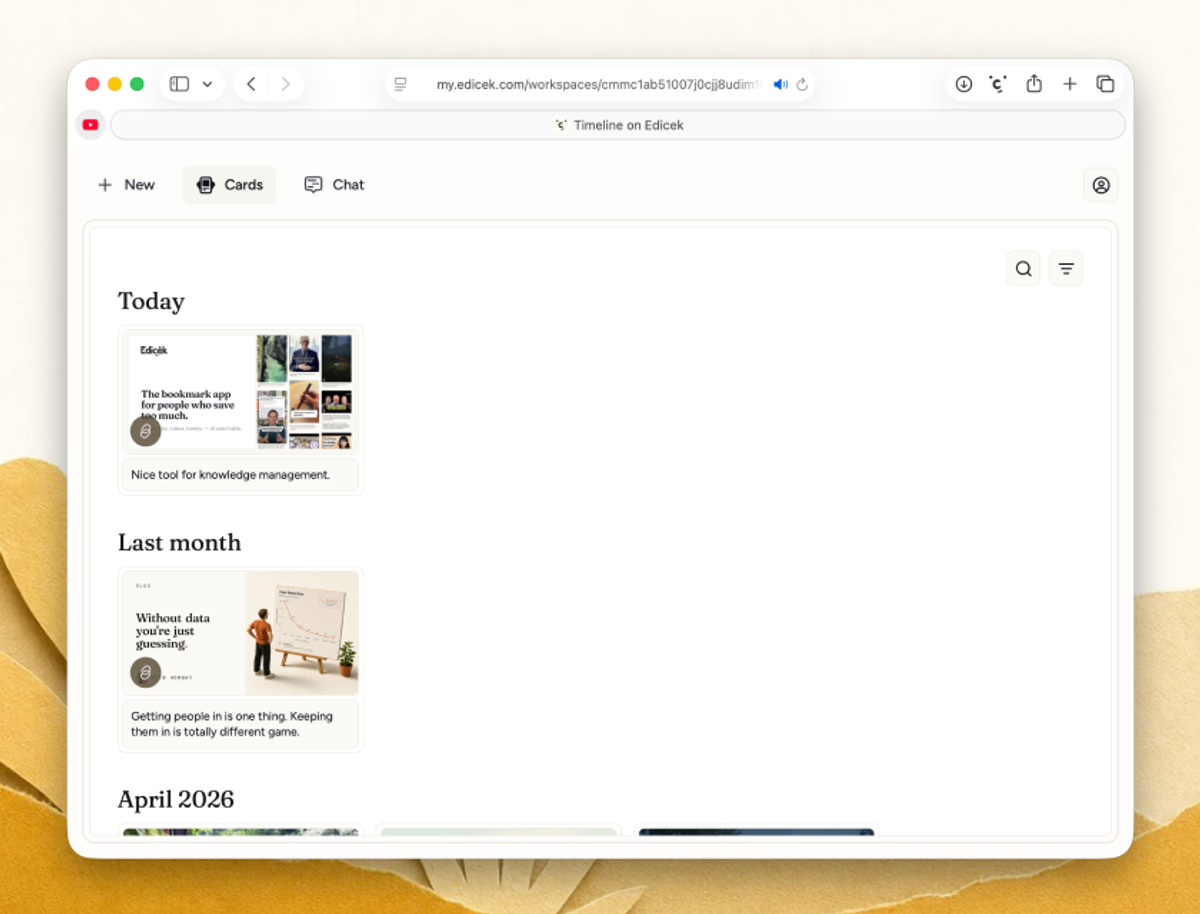
The web app is the heart of Edicek - the place where everything you save comes together. Save a link, add a note about **WHY** it matters, then ask your AI assistant about any of it, all in one browser tab. It's the same library you carry on your phone, with the full room of a desktop screen to read, search, and think in.

<DownloadButton href="https://my.edicek.com" label="Open the web app" icon="open" />

<img src="https://mintcdn.com/edicek/gTB_yjO6_rYa_WRS/images/applications/web.avif?fit=max&auto=format&n=gTB_yjO6_rYa_WRS&q=85&s=8f8315b14ed37f0494bce789508a1e75" alt="The Edicek web app - your timeline of saved cards with the sidebar and chat alongside." style={{ width: '100%', borderRadius: '14px', border: '1px solid #ecdfcd', display: 'block', margin: '0 0 6px' }} width="1200" height="914" data-path="images/applications/web.avif" />

## Your home base

Everything you save lands in your timeline - articles, notes, YouTube videos, tweets, and more. The newest sits right at the top, so your latest saves are always the first thing you see. Open any card to visit the original link or add and edit your note.

From here you can pull anything back up with [Search](/core-features/search) or bring it into a conversation with [Chat](/core-features/chat).

## Save from the app

You don't need to leave the web app to add something. Click **New** - the `+` in the navigation - and pick what to create: a **Bookmark** to keep a link with a note about **WHY** it matters, or a **Note** to write your own thoughts. Fill it in and save.

For a web page you're already viewing in your browser, the [browser extension](/applications/browser-extension) is quicker - one click without leaving the tab.

<Tabs>
  <Tab title="Bookmark">
    <LoopVideo src="/videos/app-web-new-bookmark.mp4" variant="classic" autoPreload={true} />
  </Tab>

  <Tab title="Note">
    <LoopVideo src="/videos/app-web-new-note.mp4" variant="classic" autoPreload={false} />
  </Tab>
</Tabs>

## Next steps

<Columns cols={2}>
  <Card title="iPhone & iPad" icon="mobile" href="/applications/iphone-and-ipad">
    Edicek on the go.
  </Card>

  <Card title="Mac" icon="laptop" href="/applications/mac">
    The native desktop app.
  </Card>
</Columns>